Editing Subject Records
Subjects Subjects are the objects you are gathering information about. In most cases with Clooz, this is people. However, Clooz supports several other types of subjects such as businesses, real estate/buildings, ships and artifacts. are the objects you are researching. These are usually people, however Clooz also supports other types of Subjects such as businesses, real estate Real estate or buildings is a Subject type in Clooz. This could be any type of property: land plot, farm, building, etc./buildings Real estate or buildings is a Subject type in Clooz. This could be any type of property: land plot, farm, building, etc., ships, and artifacts Artifacts are one of the Subject types in Clooz. They are meant to represent physical objects that have some significance in your research or family history.. You link Subjects to any Information records Information Records in Clooz hold the content information coming from a document or other source. These differ from a Source record that contains most of the citation information describing the docment, or the Repository record referring to the facility or online service where the document was found. that contain information about them. Family structures and events involving a Subject can be created under each individual Information record (when the data supports it).
When entering Information Records, if you are unsure about the identity of a Subject (whether they are the same person as the person you are intending) it is best to create a new Subject record These are records in the Clooz database representing the Subjects being researched, and contain summary information about the Subject such as the birth, marriage, and death dates for people. instead of linking to an existing one. At some later point in time when you have made a proper judgment about the two Subject records being the same person, you can merge the two Subjects into one.
The data in Subjects records are meant to be based on your best assessment of all the evidence contained in the Information Records they are linked to.
Subject Content:
- User definable fields (Alternate ID, User Field 1, User Field 2; Your own labels for User Field 1 and 2 can be set in the program Options.)
- Name fields (standardized form as desired by user)
- Subject type dependent fields
Keep in mind that artifacts (as Subjects) are something you are researching or tracking (provenance). For example, researching the history of a family heirloom. If an artifact (for example, a family Bible) is the source A source record in Clooz should be viewed as the higher level components of a source citation. Citation details are pulled from the citing Information Record. of some information you use, then it should be a Source. An artifact can be both a Source and a Subject.
The Subject Editor
The Subject editor is designed to support editing the Subject records and also serve as a jumping point to the Information Records they are linked to.
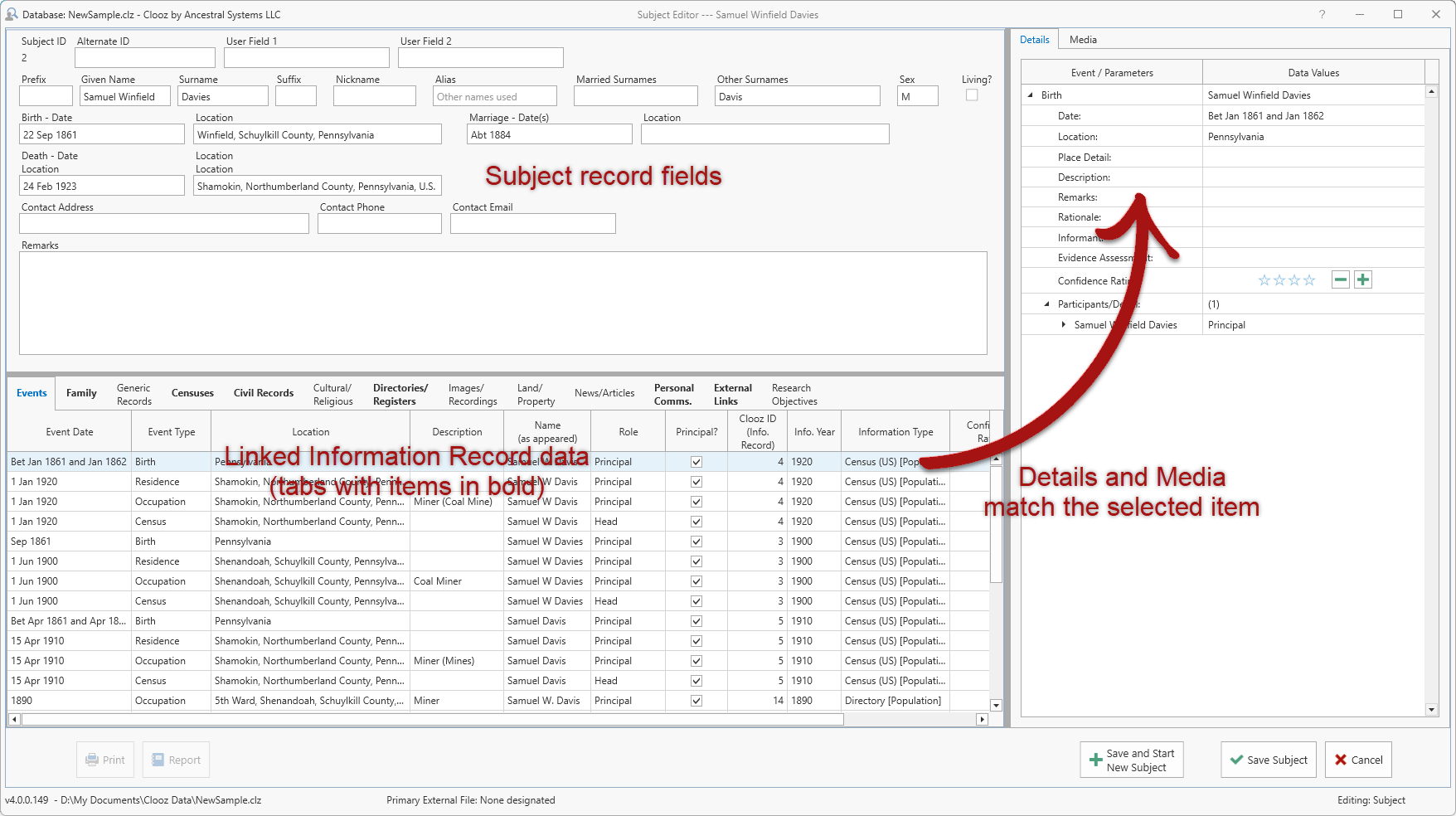
The content of the Subject record can be edited in the top panel of the Subject editor. The bottom panel has tabs for each category of Information Records, including the Events and Family designations extracted from these Information Records. You can also see a list of the external data files this subject is linked to, and Research Objectives What you are trying to accomplish while researching some specific issue, question, or hypothesis. in which they have been designated as a target subject. When a category has something listed, the tab label is shown in bold font.
When an item is selected in the Information Record data panel, the details associated with that event, family, or Information Record are shown in the Details tab in the right-side panel. The Media A digital file containing an image, text, spreadsheet, video, audio, or any other format. These can be attached to various records in Clooz as digital representations of source document content, or as Information Records (as photographs, maps, videos, or audio independent of a specific source document). tab shows any media items linked to that same Information Record.
Double-click an item in the lower panel to open the Information Record editor with the Information Record the item is associated with.
Digital media items cannot be linked directly to Subject records. If there is an image (ex., portrait or other photograph) of the subject, setup an Information Record for the media item (photo, map, audio, or video) and link the Subject record to that Information Record.